Shipping costs
Our shipping costs (excl. VAT) are : 0.00 CHF . We only ship within Germany.
FAQ
Register as a new customer in the webshop
- Start registration
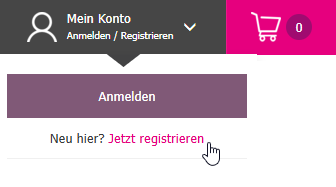
- Click on My Account – Login / Register in the top right menu.
- Then click on New here? Register now.
- Fill out the form
- On the Register page, fill out all fields completely and accurately.
- Click on Register at the end.
- Verification by our sales team
- Your details are automatically forwarded to our internal sales team.
- A credit and company data check is performed.
- Upon successful verification, we activate your access.
- Confirmation email
- You will receive an email with a link to set your personal password.
- Log in to the webshop
- Go back to My Account – Login / Register and select Login.
- Enter your email address and password.
Forgot password
- Access the login page
- Click on My Account – Login / Register in the top right and then on Login.

- Reset password
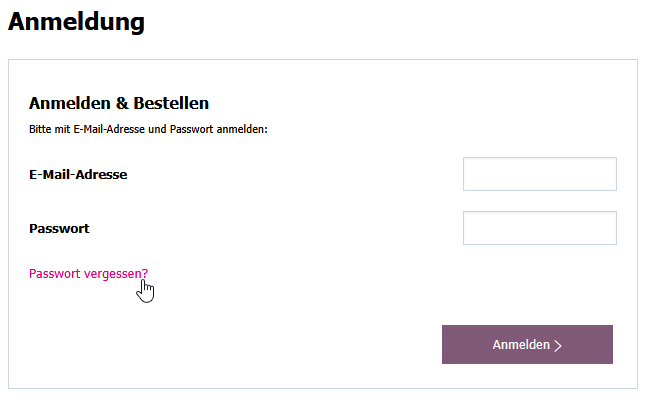
- On the Login & Order page, click on Forgot password?
- Enter email address
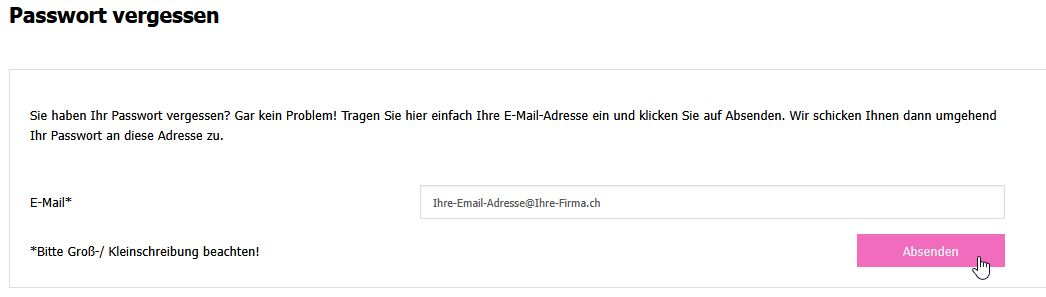
- Enter the email address of your customer account and click on Submit.
- Email with recovery link
- You will receive an email with a link for password recovery.
- Click the link – you will be directed to the Set Password page.
- Create a new password
- Enter your new password (at least 8 characters, only allowed characters).
- Click on Submit to save the password.

- Log in with the new password
- You can now log in with your email address and new password.
Save different delivery addresses (e.g., construction sites)
- Log in
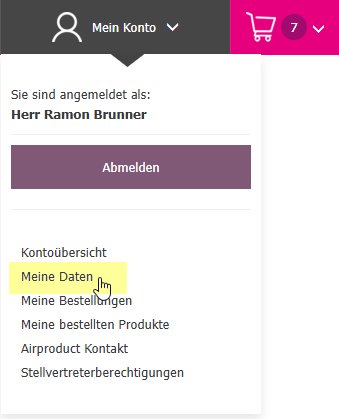
- Go to My Account in the top right and log in.
- Manage delivery addresses
- Select My Data from the menu.
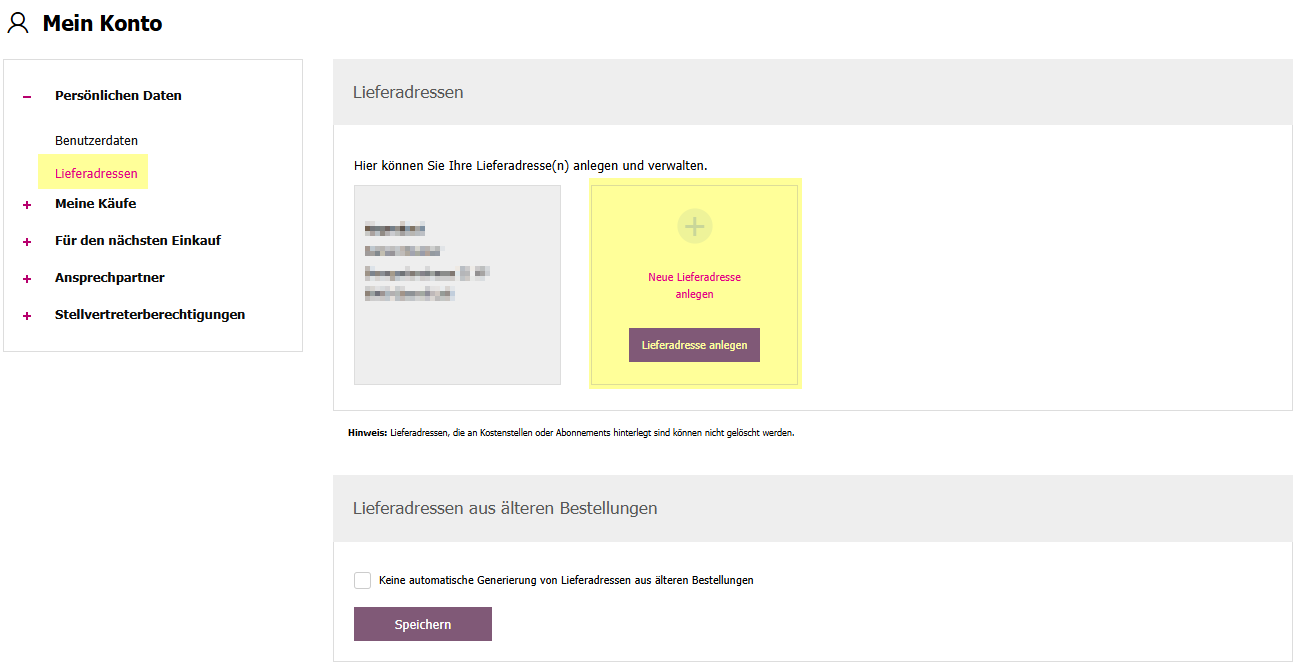
- Click on Delivery Addresses in the left sidebar.
- Create a new address
- Here you can enter and save as many delivery or construction site addresses as needed.
- Select address during checkout
- In the checkout process after the cart, simply select the desired delivery address.
Save and reuse shopping carts
- Create a shopping cart
- Add the desired items to the cart.
- Enter a name at the bottom of the cart, e.g., Fastening Materials.

- Save the cart
- Click on the icon with the downward arrow next to the input field.
- Your cart will be saved in your account.
- Access saved carts
- Go to My Account → Account Overview.
- Select For the Next Purchase → Saved Carts on the left.

- Reuse a cart
- With the Reuse Cart button, load all items directly into the active cart.
- Edit carts
- You can add, remove, or adjust item quantities at any time.
- The name can also be changed.
Create favorites
- Save an item as a favorite
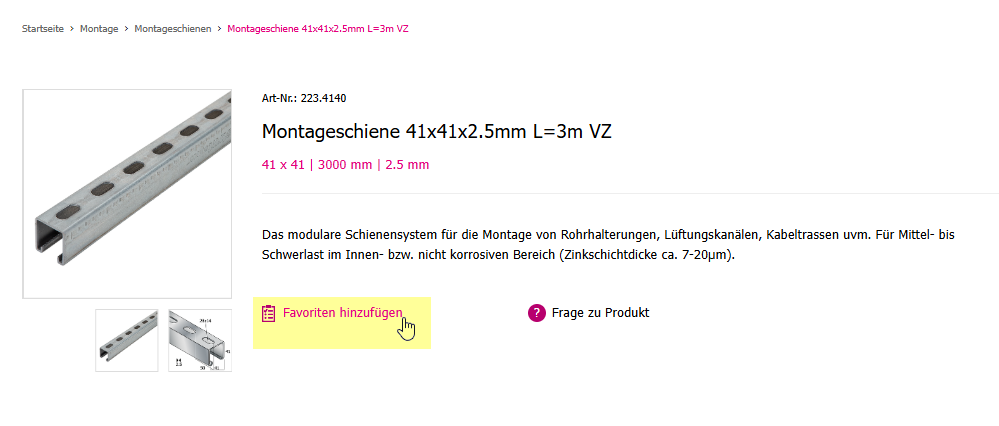
- Open the desired item.
- Click on Add to Favorites below the product description.
- Access favorites
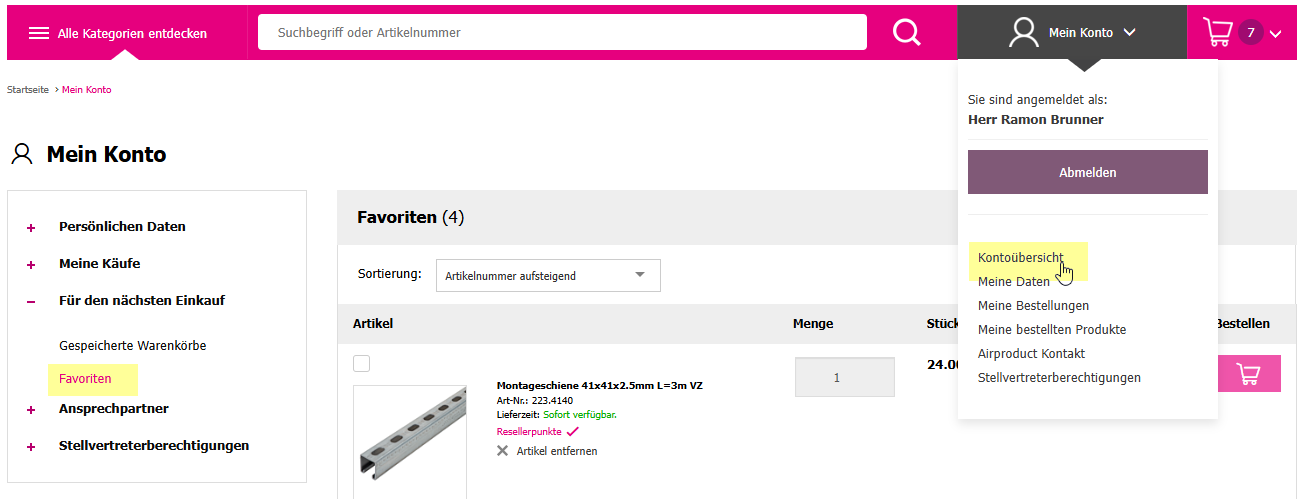
- Go to My Account → Account Overview in the top right.
- Select For the Next Purchase → Favorites in the left menu.
- Manage favorites list
- Here you will find all saved items.
- This allows you to quickly reorder frequently needed products.
Redeem reseller points
- Log in
- Log in to the webshop with your credentials.
- Redeem points
- Add items to the cart.
- In the cart, find the Redeem Reseller Points field.
- Enter the desired number of points and confirm.
- View points balance
- Directly in the cart under Go to Reseller Overview or
- in the menu under My Account → My Orders → Reseller Program.

Grant proxy authorization
This function allows your personal consultant (field service employee / regional manager) to place orders on your behalf.
Note: Your consultant does not see your personal data – they can only place orders to your saved delivery address.
- Log in
- Go to My Account – Login / Register and log in.
- Set up authorization
- Open the My Data menu item.
- At the bottom in the Authorizations section, check the Yes box.
- Save the changes.

- Revoke authorization
- You can revoke the authorization at any time using the same checkbox.
- Order by consultant
- With active authorization, your consultant can place orders on your behalf.
Find a contact person
- Log in
- Go to My Account – Login / Register and log in.
- Open contact persons
- Select the Airproduct Contact menu item.
- In the left sidebar under Contact Person, click on My Contact Person.

- View contact details
- Here you will find the details of your personal contact person (regional manager).
- General contact details can be found in the same section under Airproduct Contact.
Order overview & history
- Log in
- Go to My Account in the top right and log in.
- Open order overview
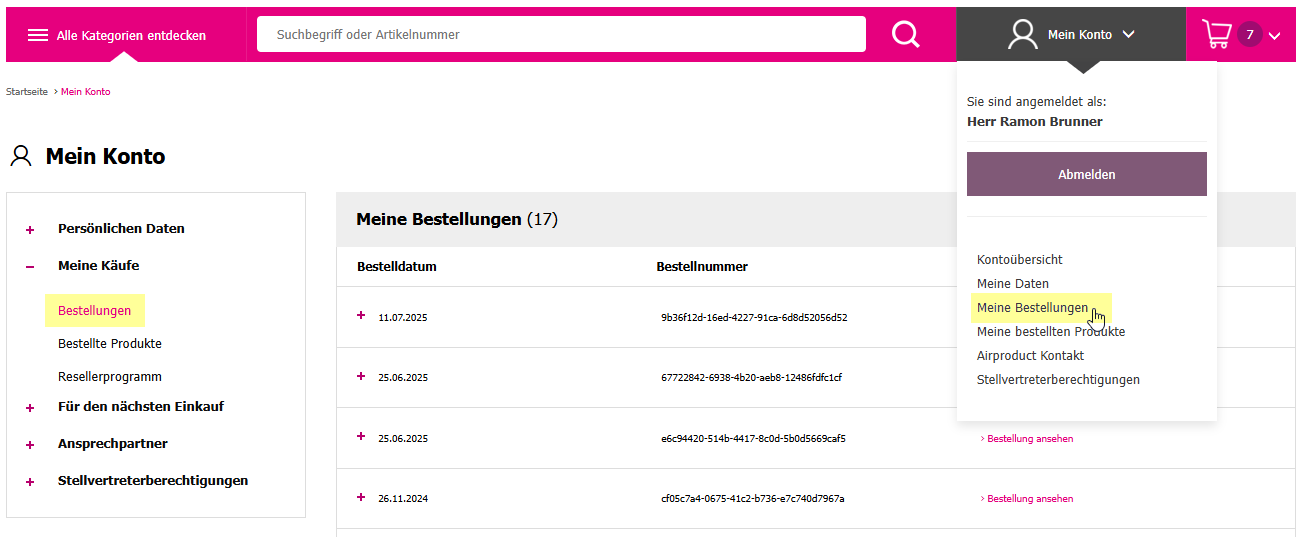
- Select My Orders from the menu.
- View orders
- Here you can see all orders placed via your login.
- Order date, order number, and total prices are displayed.
- View details
- Click on an order to see the details (including items, quantities, and prices).
Returns & complaints
- Access the returns page
- In the webshop, go to Returns in the footer menu
- or directly via my-airproduct.ch/de/retouren.
- There you will find the online form for returns and all important information.
- Fill out the form
- Enter your customer number, invoice number, contact details, and the reason for the return.
- For more than 3 items, please list all item numbers and quantities in the Remarks field.
- After submission, a PDF document is generated – please print, sign, and include it with the return.
- Return the goods
- Please return the goods in their original packaging and unused.
- Only registered returns are accepted.
- A restocking fee of 10% of the net goods value applies for reintegration.
- Returns are possible within 14 days of receipt.
- Processing
- After checking the return, you will receive a confirmation via email.
- Depending on the case, a credit or replacement will be issued.
Note: Returns and complaints cannot be recorded directly in the customer account. Please use only the return form on the returns page.
Newsletter / Promotions
- Subscribe to the newsletter
- In the webshop, go to Newsletter at the bottom in the footer menu
- or directly via my-airproduct.ch/de/newsletter.
- Choose your language and subscribe with your email address.
- This way, you won’t miss any promotions, product news, or discounts.
- Update profile and company data
- Want to update your contact, phone, or company details in the newsletter?
- Click on the Profile link in the newsletter email.
- There you can easily update your data.
- Unsubscribe from the newsletter
- If you no longer wish to receive newsletters, click on Unsubscribe at the bottom of the newsletter.
- You will be automatically removed from the mailing list.
Note: Newsletter subscription and management are not handled through the customer account but exclusively via the newsletter page or links within the emails.
Opening hours & locations
- View opening hours
- The current opening hours of our shops in Oberwil-Lieli (AG), Münchenstein (BL), and St. Gallen (SG) can be found in the webshop at the bottom in the footer menu under Opening Hours
- Craftsman Shop Oberwil-Lieli (AG) my-airproduct.ch/de/opening-hours.
- Craftsman Shop Gossau (SG) my-airproduct.ch/de/opening-hours.
- Craftsman Shop Münchenstein (BL) my-airproduct.ch/de/opening-hours.
- Locations & contact information
- On the opening hours page, you will also find the exact addresses, phone numbers, and email contacts of the locations.
- Special opening hours
- Before holidays or company events (e.g., Christmas dinner, inventory), special opening and shipping times are announced in advance under 🛈 Special Opening Hours 🡕.
Repairs
- General information
- Airproduct does not carry out repairs itself but is happy to assist you in finding the right service partner – both during and after the warranty period.
- In the webshop, go to Repairs at the bottom in the footer menu
- or directly via my-airproduct.ch/de/repairs.
- Repair during the warranty period
- If your device has a defect during the warranty period, please contact the responsible service partner or manufacturer directly.
- Contact details can be found in your device’s user manual or on the manufacturer’s website.
- Repair after the warranty period
- Even after the warranty expires, you can contact the relevant service partners for a repair or quote.
- Service partners of our brands
- Airproduct works with the following manufacturers and partners:
- Milwaukee, Makita, Honsel, UP Group, Genie Hoist Lift / SL Lift / SLA Lift, Näf General Repairs (e.g., CM 340 Lift, CM 520 Lift).
- Support from Airproduct
- If you need help with your repair process, our team is happy to assist in finding the right contact person or manufacturer.
- Don’t hesitate to contact us – we’ll support you quickly and easily.
Note: Airproduct does not perform repairs itself but connects you directly with the official service partners of the respective brands.
Delivery & shipping
- Delivery times & shipping process
- Orders received by 4:15 PM (3:15 PM on Fridays) are usually shipped the same day.
- If there is a supply issue, we will inform you promptly.
- Follow-up deliveries are free of charge for you.
- 98.9% of all orders are shipped immediately.
- Delivery area
- We deliver throughout Switzerland.
- International deliveries are possible upon request.
- Pickup at our shops
- Many items can also be picked up directly at our shops in Oberwil-Lieli (AG), Münchenstein (BL), and St. Gallen (SG).
- Opening hours can be found in the footer menu under Opening Hours.
- Shipping options
- Standard shipping – Ordered today, delivered tomorrow
- Minimum order value: CHF 10.–
- Shipping costs based on order value:
- from CHF 10.– → CHF 12.50
- from CHF 100.– → CHF 18.00
- from CHF 750.– → CHF 59.00
- from CHF 3,000.– → CHF 99.00
- Express package (on request)
- For goods up to 100 kg, maximum girth 400 cm
- Minimum order value: CHF 32.–
- Delivery by 12 PM the next day → CHF 25.00
- Delivery by 8 AM the next day → CHF 80.00
- Turbo delivery service (for emergencies)
- Delivery within a 50 km radius of Oberwil-Lieli
- Duration: max. 3 hours from order receipt
- Minimum order value: CHF 500.–
- Goods up to 100 kg / max width 160 cm / max length 300 cm
- Costs: from CHF 80.00 + CHF 2.–/km beyond 50 km
- Order possible on weekdays until 2:00 PM
- For all shipping options, contact us at: 📞 +41 (0)56 633 9 633
- Standard shipping – Ordered today, delivered tomorrow
Note: All information on delivery, shipping, and shipping options can be found in the webshop at the bottom in the footer menu under Delivery & Shipping.